Use your NOFOS charger day to day
A practical guide to the app, charger details, charging plans and the settings you use most often in daily operation.
Using the app
An introduction to the app layout and the main areas you will use most.
NOFOS chargers are set up and managed through the "NOFOS: Smart EV charging" app, which is available here:
- Android: https://play.google.com/store/apps/details?id=com.nofos
- iPhone: https://apps.apple.com/dk/app/nofos-smart-elbil-opladning/id1589307196
Download and install the app. After that, set up an account for yourself if you did not already receive those details during the order.
Once you are logged in, the app always shows a menu at the bottom of the screen. From there, you can move between the main parts of the experience.

- Home: Lists the chargers you have access to.
- Stats: Shows electricity prices and charging statistics by hour, month or session.
- Profile: Collects settings related to your account.
Home page
Your starting point for all chargers you own or can access.
The home page shows every charger available to you and acts as the entry point for charger management.
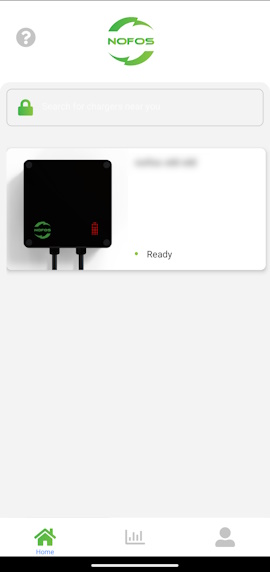
- Tap the relevant charger to open details and settings.
Charger details
Status, recent activity and quick access to charging controls.
After choosing a charger from the home page, you can monitor current activity and change how the charger operates.
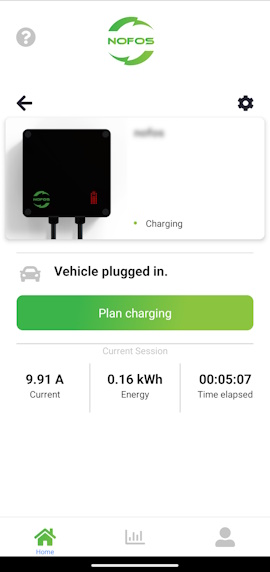
- Review charging details for the previous session.
- See charging details for the current session when charging is active.
- Plan charging using the green button.
- Change charger settings using the cogwheel icon in the upper-right corner.
Charger settings
Detailed control of name, access, power limits and user management.
The charger settings section lets you configure the charger in detail.
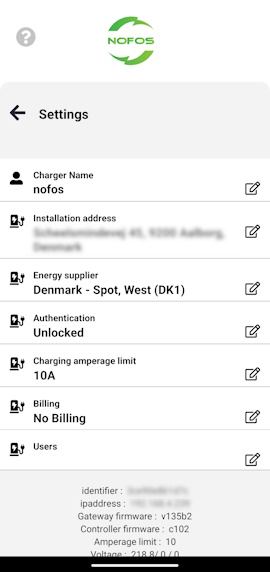
- Charger name: Give the charger a clear, recognizable name.
- Installation address: Helps the system calculate energy costs correctly.
- Energy supplier: Also supports cost calculation.
- Authentication: Defines who is allowed to charge.
- Unlocked: Anyone can charge by plugging in.
- Private: Only users with access to the charger can charge, and charging is started from the app.
- Public: Any user authenticated in the NOFOS app can charge. Billing determines whether charging is free or paid.
- Charging amperage limit: Lowers the maximum current a vehicle can draw.
- Billing: Used together with public access when users should pay for charging.
- Users: Manage owners and users with access to the charger.
Planned charging
Set the rules for how and when the vehicle should charge.
Planned charging lets you tell the charger how it should schedule charging on your behalf.
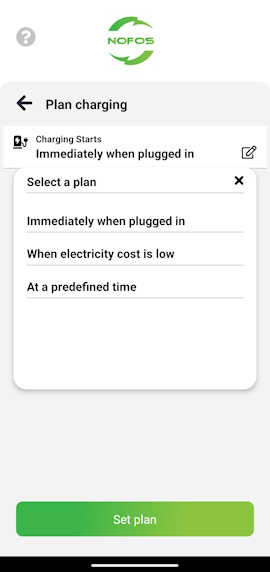
- Start charging immediately when a vehicle is plugged in.
- Charge automatically when electricity cost is low.
- Start and stop at a specific time.
When electricity cost is low
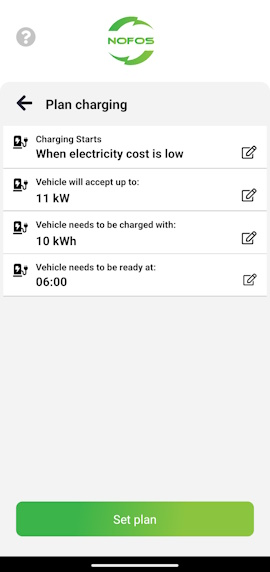
The system calculates the optimal charging window each time you plug in your vehicle. The calculation is based on:
- How many kWh you want to add to the vehicle.
- When the vehicle needs to be ready.
- The maximum charging power in kW.
At a predefined time
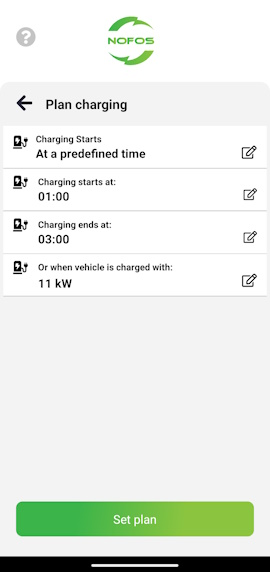
This mode tells the charger to start and stop at the exact times you define, or when a specific amount of kWh has been delivered.
- Start time
- End time
- Number of kWh to add to the vehicle
WattSense
Use surplus solar power for charging.
WattSense lets NOFOS charge when your home exports surplus power to the grid. A reader at the electricity meter measures export, and the charger can start, pause or continue charging based on the threshold you choose.
Using WattSense in the app
- Open the charger in the app and choose planned charging.
- Enable WattSense if the feature is available for your charger.
- Set the watt threshold that must be reached before WattSense may start charging.
- Choose the charging plan that fits your day: start immediately, low electricity cost or predefined time.
Threshold
The threshold controls how much surplus power must be available before WattSense charges the vehicle. A lower threshold starts charging earlier, while a higher threshold waits for more self-production.
On a 1-phase installation, the vehicle typically charges with a minimum of about 1.4 kW. On a 3-phase installation, the minimum is typically about 4.1 kW. Choose a threshold that fits both the installation and how much power you accept supplementing from the grid.
How WattSense works with charging plans
- Start immediately: The vehicle is ready to charge, but WattSense acts as a gatekeeper and starts only when there is enough surplus.
- When electricity cost is low: NOFOS plans around low-cost hours, but WattSense can also use solar surplus earlier and reduce the amount needed from the grid later.
- Predefined time: The vehicle charges during the chosen time window, while WattSense can also use surplus power outside that window.
If charging does not start
- Check that WattSense is active for the charger.
- Check that the vehicle is connected and that the charger is ready.
- Check that the threshold is not set higher than the current surplus production.
- Remember that WattSense uses short delays to avoid starting and stopping charging too often.
Profile options
Personal settings, support access and preferred vehicle configuration.
The profile section lets you change settings related to your own account.
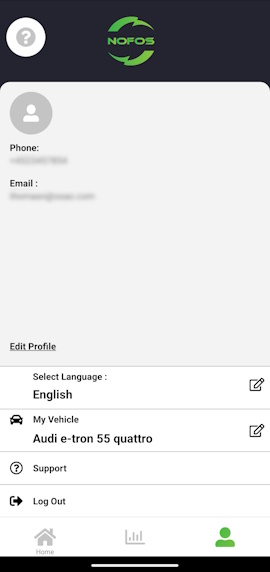
- Edit profile: Change your name, phone number or password.
- Select language: Choose the language used in the app.
- My vehicle: Select the vehicle you most often charge so charging calculations are more accurate.
- Support: Contact NOFOS.
- Log out: End your current session in the app.
Sessions and statistics
Track cost, history and charging patterns for each charger.
Sessions and statistics provide an overview of charging cost and charging history for each charger.
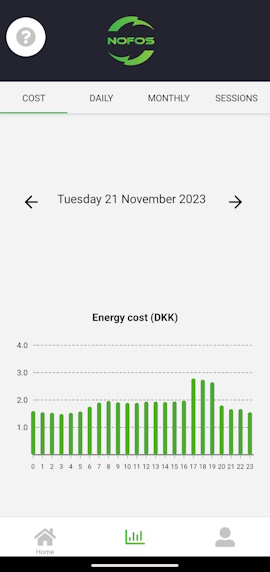
- Cost: Past and expected cost per kWh.
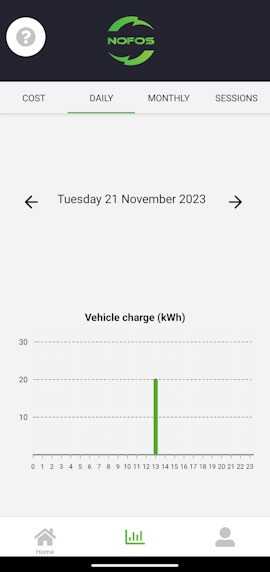
- Daily: Charging per hour.
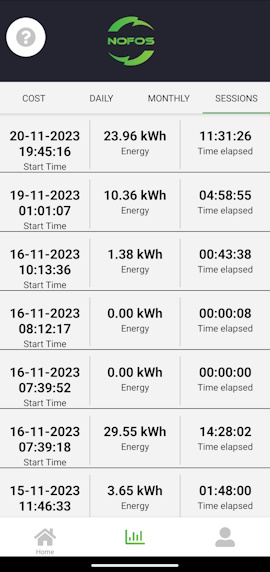
- Sessions: History for each completed charging session.
Advanced integration
Local integration options for advanced users who want to connect the charger to their own systems.
Besides the NOFOS app, the charger also supports local integration over HTTP, MQTT and low-level RAPI commands. This can be useful if you want to build custom dashboards, automate workflows on your local network or connect the charger to a broker-based home automation setup.
Read the technical guide
The advanced integration guide covers local endpoints, MQTT topics, configuration fields and recommended usage patterns for power users and developers.